Calendar
The calendar module lets you manage your office hours, record absences, and handle your patients' appointments.
Sections
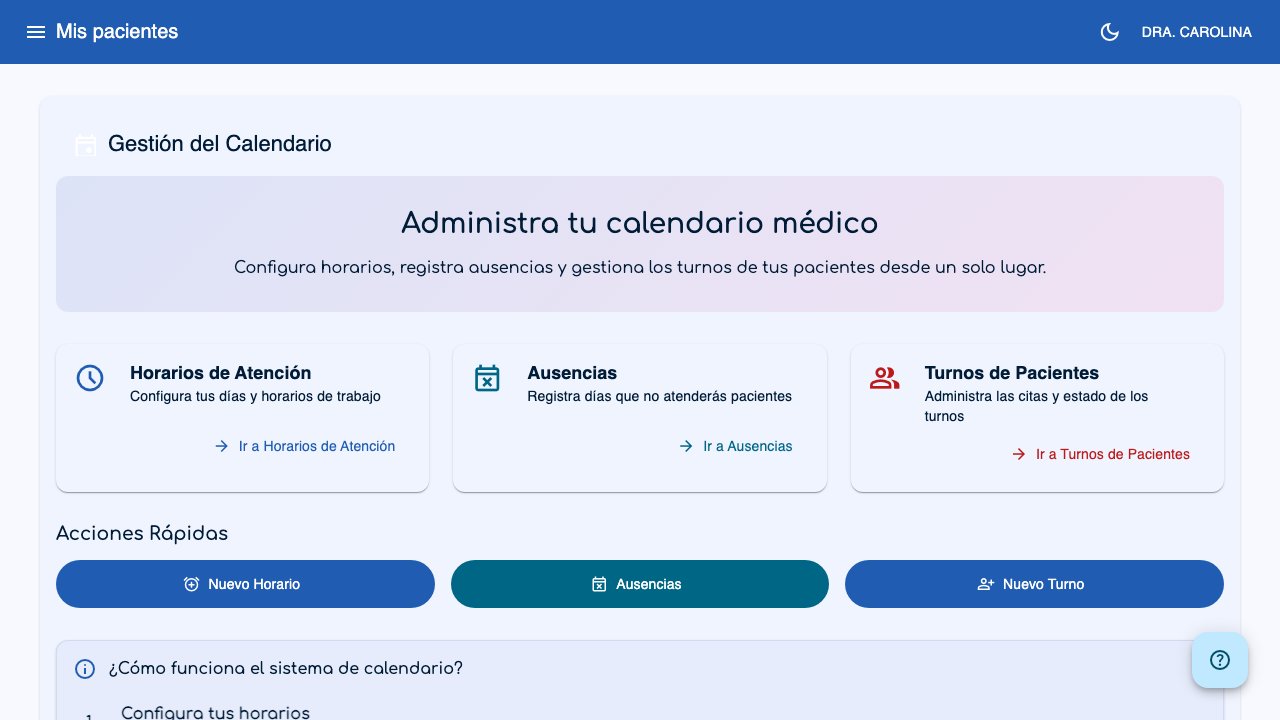
The calendar hub shows three main sections:
 1
2
3
4
5
6
1
2
3
4
5
6
The cards (1, 2, 3) take you to each section. The Quick Actions buttons (4, 5, 6) let you create a new schedule, record absences, or schedule an appointment directly.
Office Hours
Set the days and hours you see patients. You can define multiple schedules for different days and locations. See Office Hours for more details.
Absences
Record the days you will not see patients (vacations, holidays, and so on). Absence days automatically block the creation of appointments. See Absences for more details.
Patient Appointments
Manage your patients' appointments: create, edit, and change the status of appointments. Available in list, weekly view, and monthly view. See Appointments for more details.
Recommended flow
- First, set your office hours.
- Then, record any known absences.
- Finally, start scheduling appointments for your patients.
Tip
From the calendar hub, you can quickly create a new schedule, record absences, or schedule an appointment using the quick-access buttons.